WELCOME TO |
 |
Common Cents Software has been developing custom solutions for business problems since 1981. When there just isn't an "off-the-shelf" solution - custom software must be built from the ground up. Built on the foundation of RealSoftware's Cross-Platform development system RealStudio - Common Cents Software runs effortlessly and competently on Windows (XP - Windows 7 (32 /64bit) or the Macintosh System 10 platforms with equal grace and speed - and is scalable from small single-user installations to Client / Server installations of a couple hundred workstations - plenty of capacity for the full range of our customers needs.
Common Cents Software includes the following Products:
- ChargeIt™ - Petroleum back office billing system with Gasboy Cardtrol remote read interface.
- TrackIt™ - Manufacturing Inventory, Sales and Serial Number tracking.
- WaterWorx™ - Rural Water Utility Billing and Management System.
|
WaterWorx ™ |
Water Utility Billing and Management System
|
|
| Over 20 years in commercial service - this fully mature and competent package was designed by and for water system operators - from small rural systems of perhaps a couple hundred meters - to large systems of 200,000+ meters. It is designed primarily for rural water systems - including those operating under the funding and supervision of the Farmers Home Administration - but fits well with municipalities as well. Provides excellent audit controls of all aspects of cash, production, and management - making operation of the Water System straight forward and yet meets all requirements of standard accepted accounting procedures - and the FmHA. |
|
Here are just some of WaterWorx™ features: |
- Can accommodate any number of rate tables (user maintained); with independent tables for water, sewerage and garbage; can bill misc. additional charges as well (such as once a year testing charges, etc.)
- Simple payment posting system handles multiple application payments (where one payment pays two or more accounts); cash, checks, money orders, drafts, Credit Cards, etc. all handled effortlessly. Prints bank deposit slips. Automatically generates and prints drafts.
- Generates fully compliant (or modified if needed) NACHA files for electronic draft submission.
- Handles multiple reader routes; generates traditional meter sheets (separated by route if desired); high speed keying routine for posting from meter sheets; easily exports to and imports from hand-held data collectors - and radio read collectors such as Neptune's EZRoute System; Master Meter's "Greentree"; and Badger Meter's Read Center / Orion systems as well.
- Handles Volunteer Fire Department donations - handles multiple departments; tracks donations and provides simple concise collection and distribution reports. Can provide donation statements to customers for tax purposes.
- Multiple tax authority collection, tracking and reporting.
- FULLY compliant with IRS regulations for asset distribution allocation rules - asset "ownership" is calculated for each member and their "distribution" is calculated and printed in a formal report - either as a "demonstration" report (percentages only) - or as an actual allocation report (dollars). Note that ALL non-profit water systems must be in compliance with this requirement (IRS Revenue Ruling 72-36. 1972-1 CB151).
- Database is SQL - fully compliant to standards - so external programs can interact with the data (Crystal Reports, for instance).
- Historical data (meter readings, usage, charges, misc. charges and payments / credits are maintained permanently... a customers history can be printed out since the installation of the system.
- Simplified customer / new member setup and entry.
- Independent Member / Customer files and Meter files - automatically carries forward all appropriate data to a new customer moving in to an existing meter.
- Any and all data can be easily exported- for analysis in spreadsheets, etc.
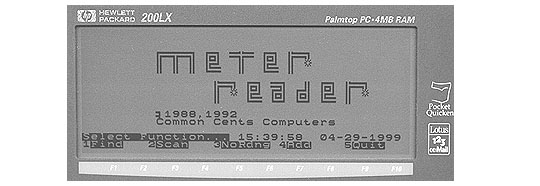
- Available as single user (recommended for 250 - 2500 customers) and multi user (Server / Client) (recommended for 2500-200,000 customers). We currently support several types of handheld data collectors - including the HP 200LX series, and the Husky / Itron FS3 and Juniper CE data collectors. A use license for MeterReader™ -- our handheld data collector meter reading software is included in the price of WaterWorx ™ -- and that single price covers all of the handheld data collectors owned / used by your water system - you don't have to buy multiple licenses.
|
|
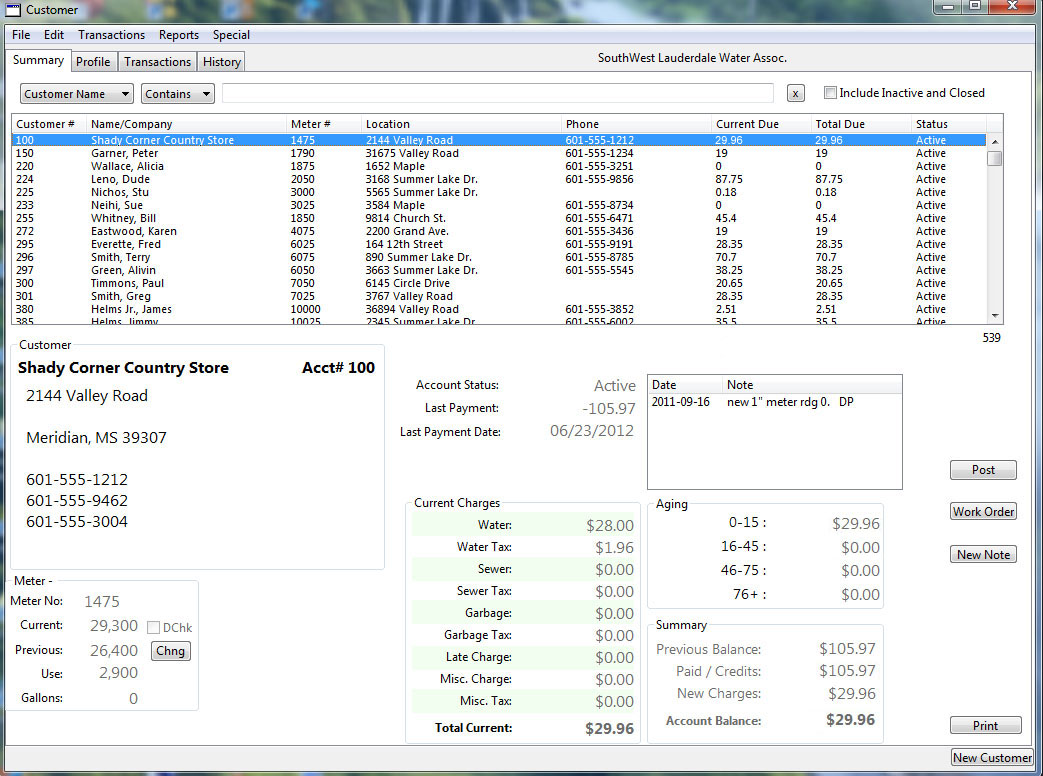 |
| WaterWorx™ Main Screen. |
|
| Most "routine" functions are performed from this screen - and without leaving this screen - The complete customer list is displayed at the top of the screen. A popup-menu allows choice of Account Number, Account Name, Meter Number, Address, Phone Number or Rate Code. Address, Phones, etc. check all related fields automatically - (for instance Home, Work and Cell Phone fields) so it doesn't matter "which" number you use. There is also a separate facility (under the special menu) that allows searching by ANY customer field. As you type - the customer list is "narrowed" as fast as you type - until you see the customer you want. You can click on that customer - and all of the customer's data is displayed in one of four tabs - This tab has a summary customer info - usage and accouting data. The Profile tab has all of the "details" about the account. The Transaction tab displays all current transactions, and the History tab displays a complete record of past activity (an on-screen version of the "proof bils"). While in the Profile, Transaction, or History tabs - next and previous buttons allow scanning through any other customer accounts still in the list area. Note the buttons down the right side - the Post button brings up a posting window - which allows Payments, Meter Readings, Credits, Debits (misc. Charges), Process a "Dis-honored" check; and post a Turn-Off Turn-On Service Charge AND payment received in one "entry". As always - multi-distribution payments are handled - making a deposit-slip entry only for the primary post (payment) - while allowing the remaining amounts to be posted to up to five additional accounts.
|
|
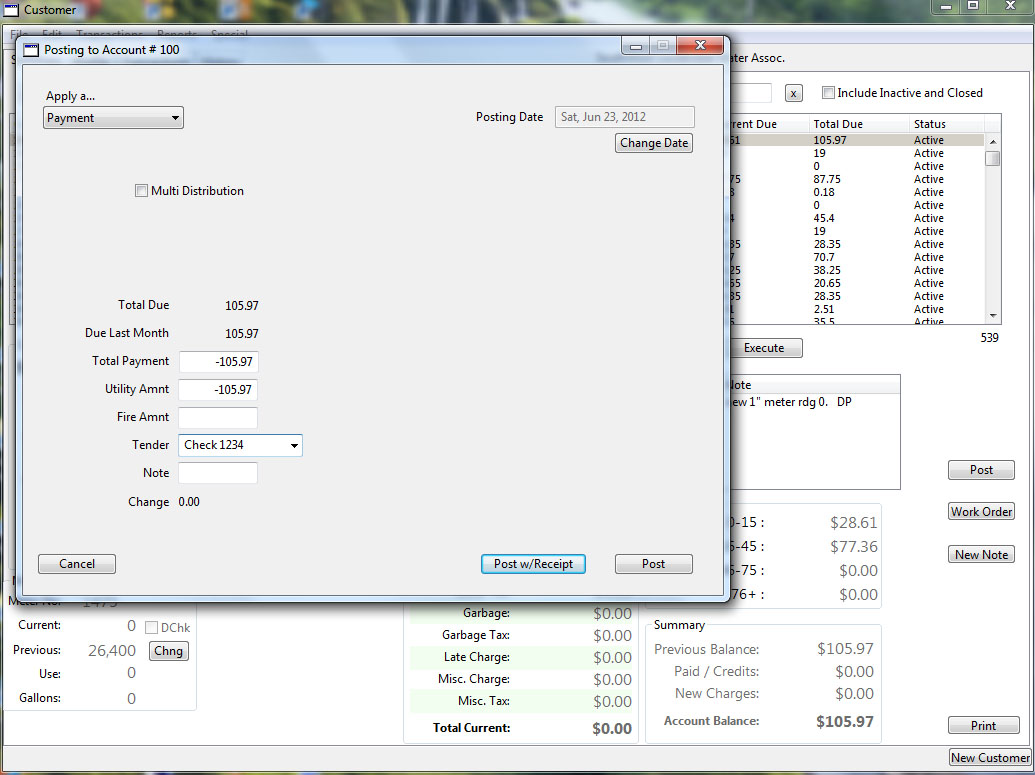 |
Payment Posting from the "Post" button -
Note that the customer's summary is still available - so you can see any details needed. If a receipt is needed - mere click on the Post w/Receipt button - and an Epson T20 Receipt printer instantly prints a receipt - showing amount due - amount paid - and new balance - (and change if appropriate). If a receipt isn't desired - merely click the other Post button.
|
|
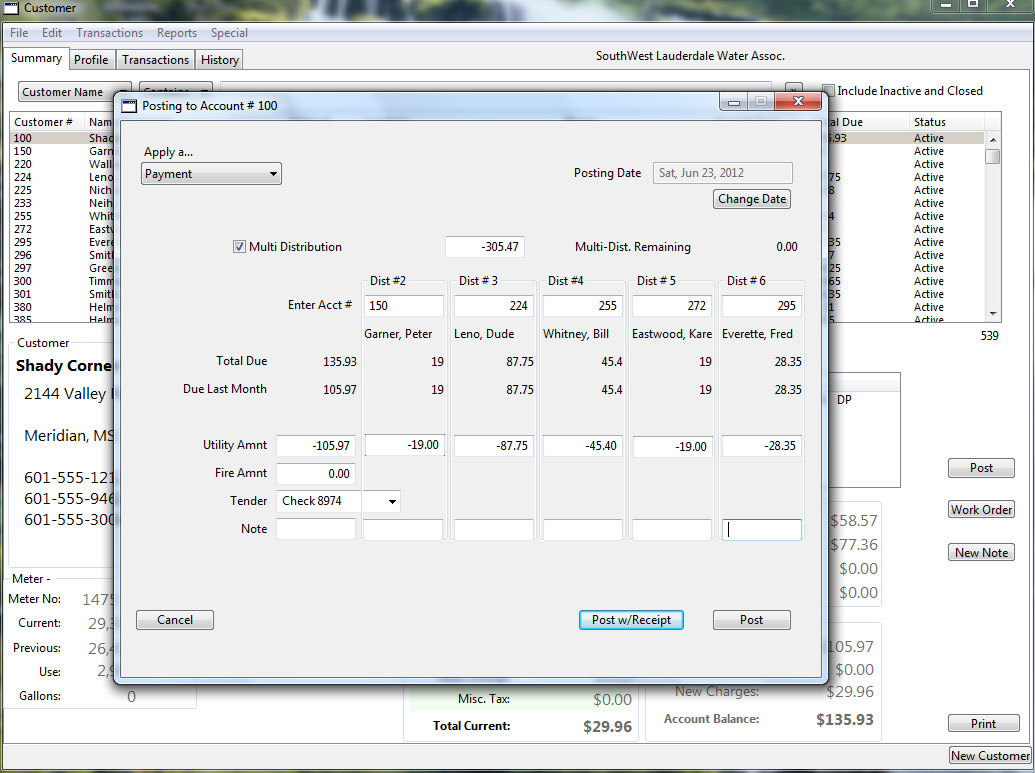 |
| Here is the payment posting window handling a primary account - and five additional accounts being paid with one check. Again - the receipt printer can be used if desired. |
|
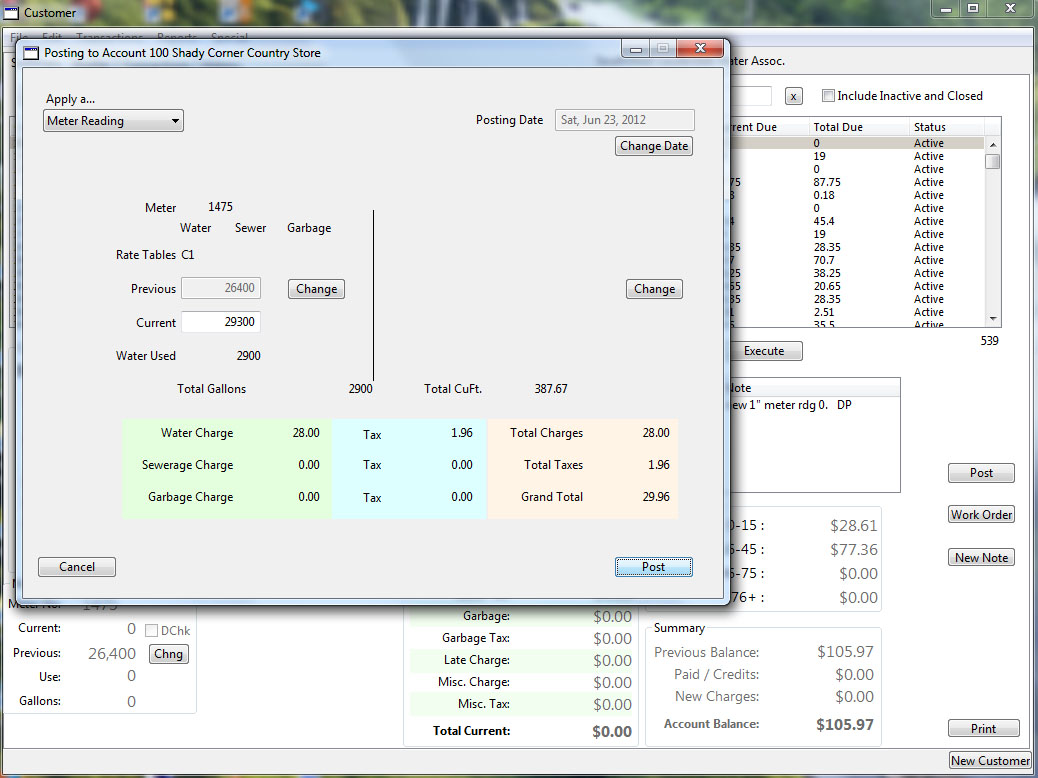 |
| Here is the Posting window being used to post a Meter Reading. Note both Gallons and CuFt are shown - If this was a compound meter - the second register numbers would be on the right half of the window. WaterWorx can handle any type of compound meter - even those with "mixed" registers (i.e. one in CuFt - the other in Gallons) - Waterworx will still calculate the correct usage. |
|
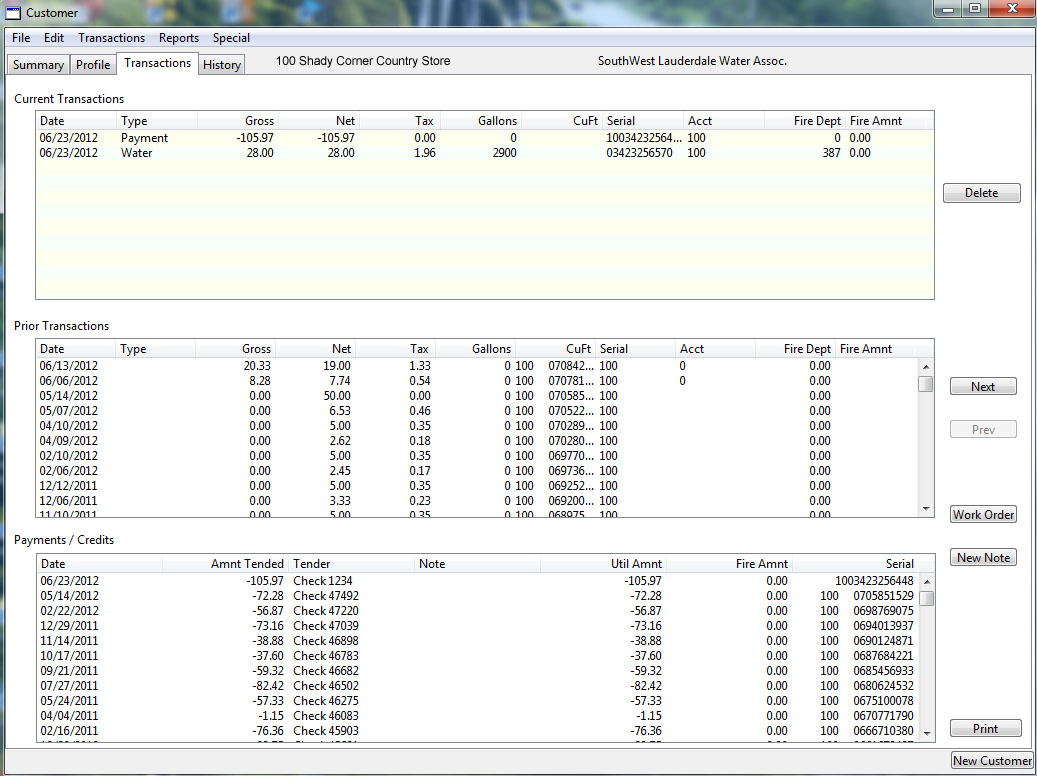 |
| This is the Transactions tab.
Note current journal entries are in the top window - and are used for all current calculations, reports and billing. Once the period is ended - they are moved to the Archive (Prior Transactions) table for permanent storage and access. Payments (and credits) are also recorded to the Payments / Credits Journal - which is also permanently retained.
|
|
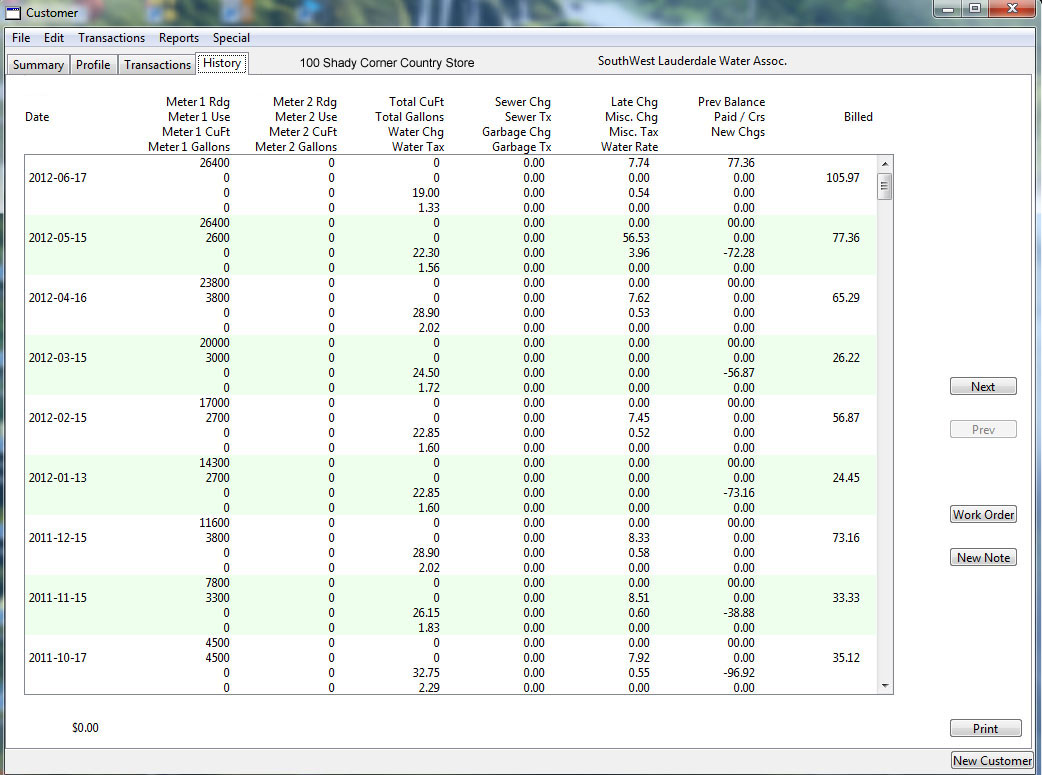 |
The History Tab.
Here is an easy to view running history of the account. This duplicates the information of both the bills - and the Proof Bills - and shows how the account has progressed through the years. Note how you can run up the right side - seeing amount billed and then paid (or not)... Makes it easy to spot how / when an account had issues. |
|
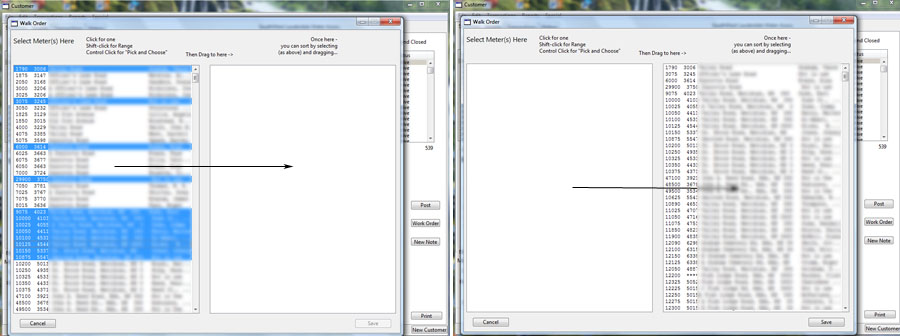 |
| Some Functions are better suited to independant actions - selected by menu. Batch Payment posting - where all operations for "chain" posting payments are carried out on one specialized screen; same with Meter Readings being posted from Meter Sheets. Another example is shown here - a "drag and drop" way to re-order the "walk order" for your system. Selections (ranging from hit and miss selections - to large "blocks" of meters) may be chosen and dragged from the source list to the destination. Once in the destination list - meters may be dragged up or down within the list. Once you are satisfied - clicking the save button will make them permanent. BTW -even on VERY large systems - it takes no more than a second or two to complete the save once the save button is clicked - so you can "adjust" anytime - with little investment in time. |
|
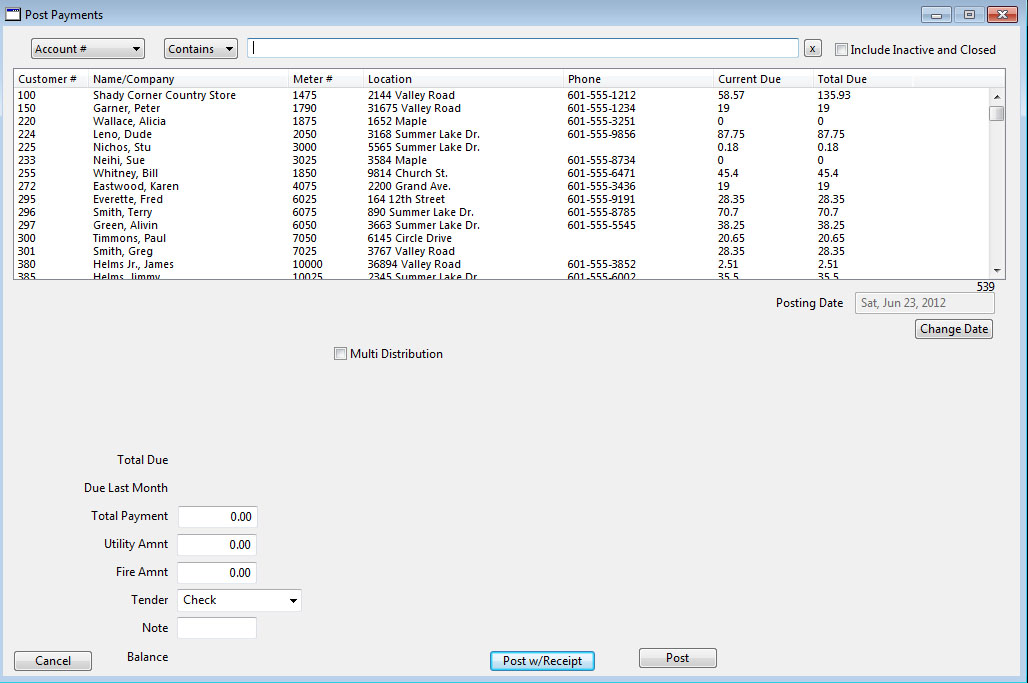 |
| Here is the batch payment post window. Quite similar to the "Post" window - but this window has the customer "selector" built-in - so you never leave this window until you are done. Again - customer's come up as fast as you can type. Selection (find by) includes Account Number, Name, Address (which automatically checks both street address fields); Telephone number (which automatically checks Home Phone, Work Phone and Cell phone fields); and Meter Number. |
|
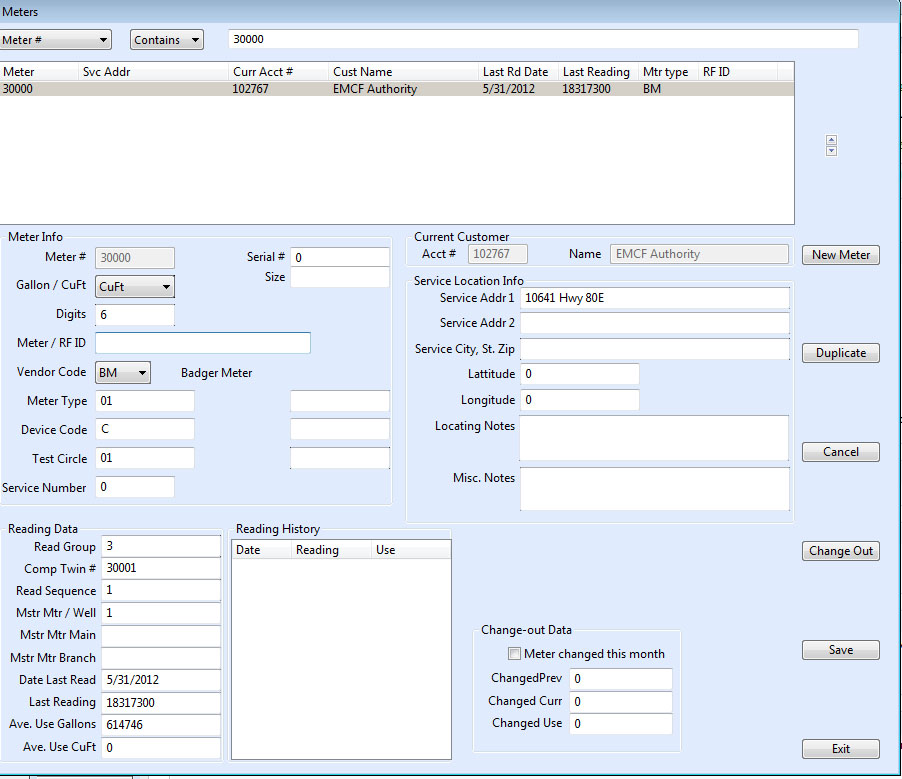 |
This is a meter record from the Meter Master Table.
Note that change-outs are handled here - simply enter the old meter's reading along with the new meter's reading - and the "previous" is adjusted to correctly bill for water used by both meters. |
|
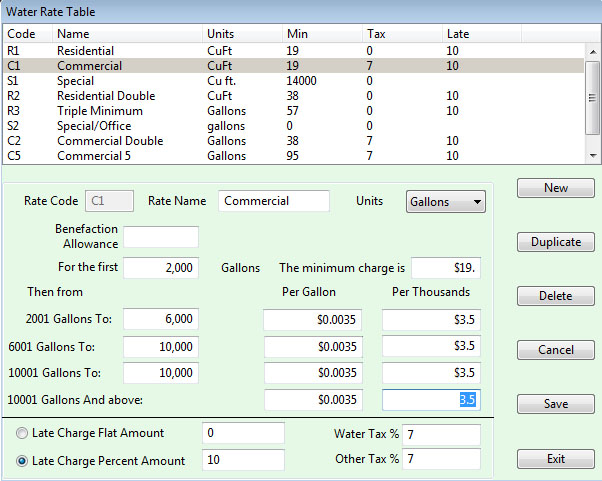 |
| Typical Water Rate Table. Note that options here allow for late charges (percent or flat); tax on water and everything else (Sewer and Garbage tables have their own similar tax handling); Also note the "Benefaction Allowance" - the ability to "overlook" some small amount of use without any charge - while charging for higher usage. Such allowance is sometime given churches and similar organizations. |
MeterReader™
Handheld Data Collector Software.
|
Announcing MeterReader™ Version 6 - for Windows CE .NET Handheld Data Collectors.
|
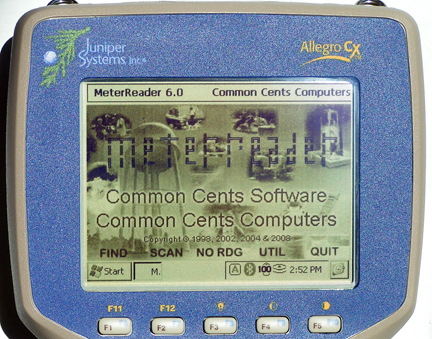 |
| This new version of MeterReader™ retains all of the features that have made MeterReader™ a favorite of so many Uilities - while adding several new features. MeterReader™ 6.0 is compatible with any Handheld Data Collector that uses the Windows CE .NET operating system version 4.2 or newer. Operators have a choice of choosing to use a new extended data file system which supports new features such as GPS locating and mapping, graphic support for documenting infield conditions, locations, etc. However - operators may choose to use the old MeterReader™ file format in which case datafiles may be freely exchanged between the Window CE units - and older DOS based Handheld collectors that their system many still have in use. That means should a Windows CE suffer a casualty in the field - it's data file can be loaded immediately and directly into a spare (retired) DOS unit - allowing readers to continue with minimal interruption. Even if the Windows unit is using the new extended file format - WaterWorx™ version 10 has a utility which will take a partially completed extended file - extract the additional data from the meters already read- and export the remaining meters into the old format for use in an old (retired) DOS Handheld. |
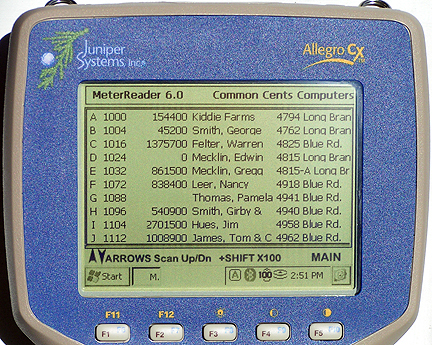 |
| MeterReader™ Meter "scan" screen |
This is the primary navigation screen. From here - pressing the up (down) arrow key moves forward (backwards) 10 meters at a time. Holding the SHIFT key - the scan moves 100 meters at a time (this can be changed by the operator to suit the size of the route). The Find function searches by Name (or street - this option is set by the operator) and gets the list into an area. The No Reading scan finds the first meter without a reading (a zero read meter is already read - the sytem knows the difference). Pressing the No Reading key again moves to the next un-read meter. The third column is the current meter reading - note that 0 is indeed the reading for meter 1024. Meter 1088 - the blank shows that meter not yet read.
As noted - Version 6.0 retains all of the familiar features of MeterReader™ - including the familiar keyboard operation using the same set of keys. All operations are carried out through the keyboard - so even if wearing gloves, or hand are muddy and wet from digging out a register - the display does not become obscured from trying to use a touch screen. The familiar F1 - F5 keys, the Alpha keys A-J, numeric keys 0-9, ESC ENTER and ARROW keys are still the "core" operating keys. The keyboard layout of the Juniper Systerm Alegro CE make this extremely easy to reach - as these keys are easily reachable "by the thumbs" - making it easy to navigate and make entries.
|
|
 |
|
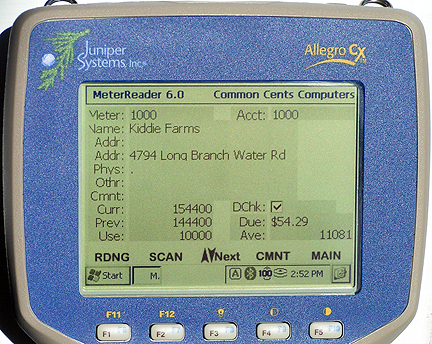
| Customer screen. Press F1 to enter reading. |
Notes in WaterWorx™ Meter files (such as physical location and misc notes (such as watch out for the nasty dog - or beware the GuardGoose) are downloaded to the handheld - so they can assist the meter reader in locating difficult to find meters, and be aware of other "issues". The reader can also enter Comments / notes for each account - noting such things as a broken / missing meter cover, or that the meter was running when read - these notes print out on the system printer when the readings are uploaded to WaterWorx™. |
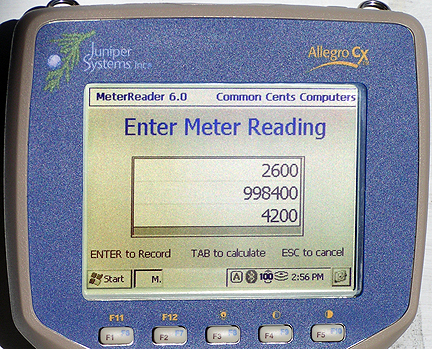 |
| Notice - that the reader need only enter the most significant digits - 4 in this case - since the last two digits (tens and gallons) aren't "significant" - they are added by the software - saving keystrokes. The reading is then checked for "reasonableness". The customer's average use (as calculated by a season-weighted algorithm in WaterWorx™) is checked against the calculated use as entered - plus or minus a range which can be set by the meter reader in the field. Notice the improved layout of the Windows CE system. Also notice on the right screen - the reading entered is much less than the previous. On many systems this would indicate a negative reading - MeterReader™ understands meter roll-overs - and automatically handles 6 - 10 digit meter rollovers. Also note that the Windows CE version now also includes a calculate function that can test a reading (by pressing TAB) before it's "Entered". |
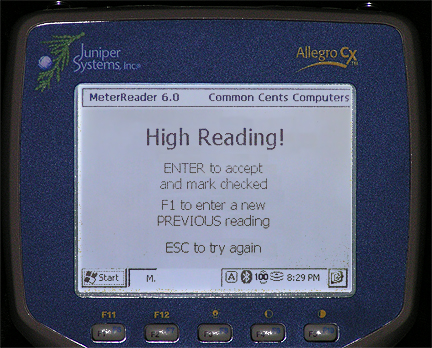 |
High reading alert.
Note here a night picture showing the Alegro's back-lit screen - extremely readable not only in daylight and dark - but at twilight as well. |
| Here the reading is high - the collector beeps - and warns the meter reader - and asks for a re-read confirmation. The meter reader can re-enter the reading or flag the reading as "Double Checked". When the readings are uploaded to WaterWorx™ - the flag is retained so the office personnel know the reading has already been checked. This saves many, many re-read trips when customers with a leak, etc. call in complaining. Note here a night picture showing the Alegro's back-lit screen - extremely readable not only in daylight and dark - but at twilight as well - when many of the older systems were difficult to see and read. High readings, Low readings, and Negative readings are all checked and alerted. WaterWorx™ generates an average use for each meter based on its history of that meter - giving the most weight to the last 12 months. The reader in the field can then adjust the tolerance of the test - to allow for unsual seasonal usage. The DOS version allows the previous reading to be changed in the edit mode - where the meter reader can change the previous reading - such as when a meter has just been changed out - and the new reading hadn't been entered into WaterWorx™. The Windows version allows a new previous to be entered from the reading mode.
|
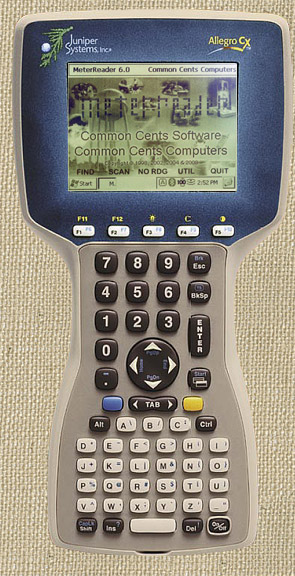 |
| Juniper System's Alegro CX |
|
MeterReader™ Version 5 works on any DOS 6.2 compatible computer.
|
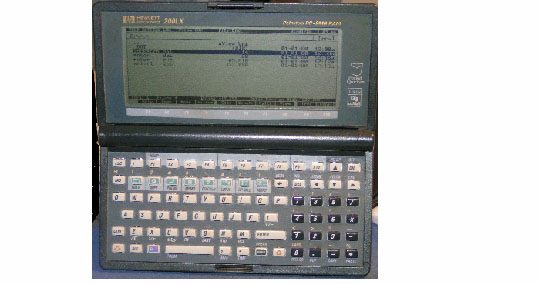 |
| HP 95/100/200LX series palm-top computer. |
|
 |
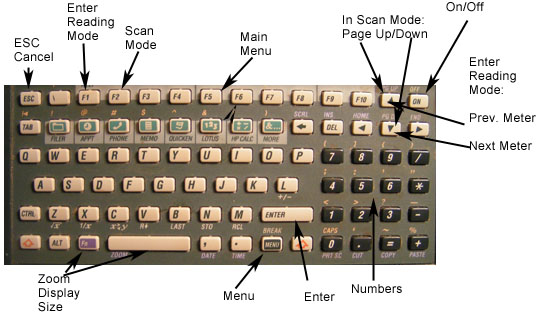 |
"Navigation" and entry keys are arranged so that they are easily pressed with the thumbs while holding the unit.
Of course all keys can be used when needed for full alpha-numeric entry for notes, etc. |
 |
|
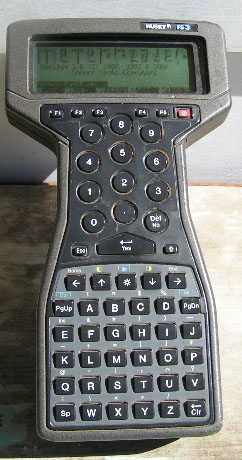
Husky FS3 data collector - slim waist for holding in one hand - while keying with the other.
Note that the Navigation keys are the same - F1-F5 for menu selection - arrow keys to move about, etc. The Husky is water proof, drop resistant; and has a back-lit display. DAP units are similar, all run the same version of MeterReader™ software - which determines which model it's on - and adjusts the display accordingly. One can even transfer the data files between units without loss or hassle (some systems that use Huskys as their primary collectors keep HPs in reserve "just in case".
|
| While Husky, DAP and similar data collector are practical for larger systems; their high can be a problem for smaller systems. On the other hand, the HP Palmtops are available on the internet for a quite reasonable price - and since they improve accuracy, and save a lot of time -- their purchase price makes them a very attractive alternative.. Of course - the HPs are not as durable - and (as one of our customers found out the hard way) they don't float - still many small systems have used them for many years - and are extremely pleased with them |
For more information - contact us at:
Common Cents Computers
2412 C Street
Meridian, MS 39301
601 482-4534 601 693-5958
or E-Mail us here: info@commoncentscomputers.com
Back to Home Page
Go to the "Links Page": Links Page
Alegro CE™ is a Trademark of Juniper Systems, Inc.
HP 95, 100 200LX are Trademarks of Hewlett Packard, Inc.
Windows, Windows XP Windows CE .NET are Trademarks of Microsoft, Inc.
Quite frankly - we don't know who now owns Husky - as the product appears abandoned.
© 2010 Common Cents Computers
|